Windows 7
Windows 7 introduced several key system management features designed to give users a central place to go for tasks and notifications associated with keeping their computer running smoothly. These tools made it easier for users to fix problems themselves and maintain their systems.
Role:
UX Designer
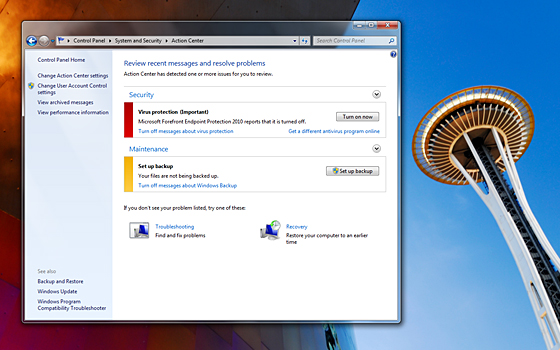
Action Center provides a central place for managing computer issues
Action Center
The Action Center is a new, integrated Control Panel experience that gives you a central place to go for tasks and notifications associated with keeping your computer running smoothly.
It makes it easier for you to fix problems yourself by providing a new streamlined experience for addressing notifications and managing computer issues. This consolidated approach helps users stay on top of system maintenance without being overwhelmed.
Company:
Microsoft
Tools:
Adobe Creative Suite, Expression Blend
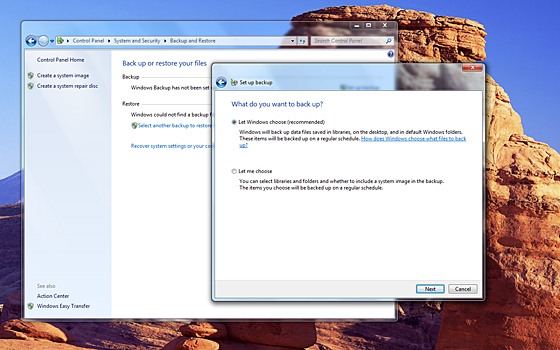
Windows Backup configuration interface
Backup
With Windows 7, it's easy to configure regular backups so that you're better prepared should something go wrong. Windows 7 helps you configure backup settings in three quick clicks, capturing all your personal files and, if you choose, your system files.
You can easily schedule regular backups, so you won't have to remember to do it manually.

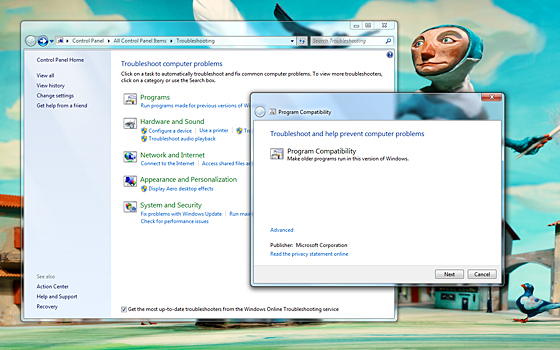
Windows Troubleshooting provides built-in troubleshooters for common issues
Troubleshooting
Windows Troubleshooting—new in Windows 7—diagnoses and resolves common operating system and hardware issues, providing built-in troubleshooters for several different types of problems.
This automated approach helps users identify and fix issues without needing extensive technical knowledge, making system maintenance more accessible to everyone.